
Gold Ship now lives in my Linux machine as a cursor
In my desire to customize my Linux machine, I searched for what cursors I could use to further personalize my setup. I ended up choosing this Gold Ship cursor set made by pixloen with some edits to the file names and added symlinks to make it usable in my Linux setup.
I want to share how I got to this point though, because it was not as easy as just downloading the files, opening the correct folder, moving files to relevant “cursors” folder, then selecting it as the cursor theme. 😅
Starting my search for the perfect cursor theme
At first, I didn’t know what cursor theme to use. I don’t really have a particular vibe I want to go with, so I had to think first of what I wanted to try out before I settled on one choice.
I started my initial search for Katamari Damacy cursors since I thought, it would be really cute to see the Prince roll a katamari as I click around my Linux setup lol But I only found this Katamari Damacy cursor (and some related Katamari Damacy cursors are also shown on the page itself), but it seemed like they were just one-off designs, and wasn’t a cursor set like I initially envisioned. So, the search continues.
Then I remembered that back in college, I used to use this Luigi cursor set1 on my Windows PC. I didn’t really have any initial idea of what kind of cursor to use when I was going down this rabbit hole, so I figured I’d start with something familiar. So I go and download the cursor pack.
When I opened the ZIP file, I saw that they were all .cur files. Alright, that seems to make sense, since they are cursors, I think to myself, but after searching about it in the Arch Linux Wiki, I then learned that it wasn’t gonna be as simple like before. Windows does have a lot of GUIs, and setting up the cursor can be configured in the system settings with a lot of point-and-click action.
On Linux though, it’s a different story.
Deciding whether to convert cursors or just look for another set
I was going to try and convert the Luigi cursor set to a Linux-friendly version, but at that point, I figured I should maybe try to find another cursor theme in case I saw something else I liked.
Side quest: actually converting Windows cursors into usable files in Linux
I knew from some web sleuthing that one could convert Windows cursor themes into Linux with win2xcur—and I even tested that now with the Luigi cursor set just to see what it outputs for the sake of this post, since I didn’t do it initially when I changed my cursor theme as I didn’t need to do it myself anymore.

(Just as an added note: I was the one that added the index.theme in the right side of the screenshot there. I noticed GTK Settings I use (nwg-look) likes it if this has some basic information like the Theme Name and a Description. I explain it more later in this post.)
So, does this work outright? Not necessarily. I had to rename a bunch of things and even set up symlinks to make it work. I can explain that more while talking about the Gold Ship cursor theme and how I set it up on my Linux machine.
Cleaning up the Gold Ship Linux cursor set
I was happy to have found this reddit post that led me to pixloen’s ko-fi shop where she has a bunch of Umamusume themed cursor sets. Immediately I went for Gold Ship’s cursor theme as my bike also shares the same namesake, and I just really like Gold Ship as a character. It’s even in my favorite color, which is red, so that’s also a plus.
I downloaded the ZIP file2 and took a peek at the files:
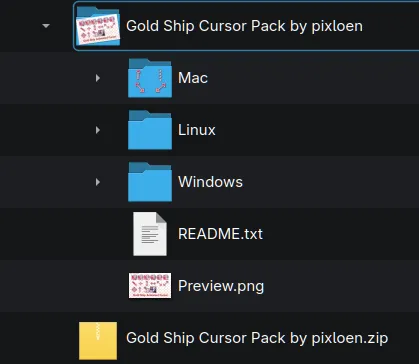
I followed the instructions laid out in Arch Linux Wiki to set up the directory properly in my ~/.local/share/icons/ folder and hoped for the best. I did see it show up in my GTK Settings > Mouse cursor tab, so I felt hopeful this was working.

(I have another item here named “Gold Ship Cursors” as that’s my properly set up cursor set already.)
I was confused at the start on why this wasn’t working. So I took a peek at how other cursor themes were set up in /usr/share/icons since I saw that was also another place one could look at for cursor themes. I looked at the Adwaita cursor set and noticed there were specific names to certain cursor image, and some were even using the same image, but had a 🔗 link icon on its preview as well.
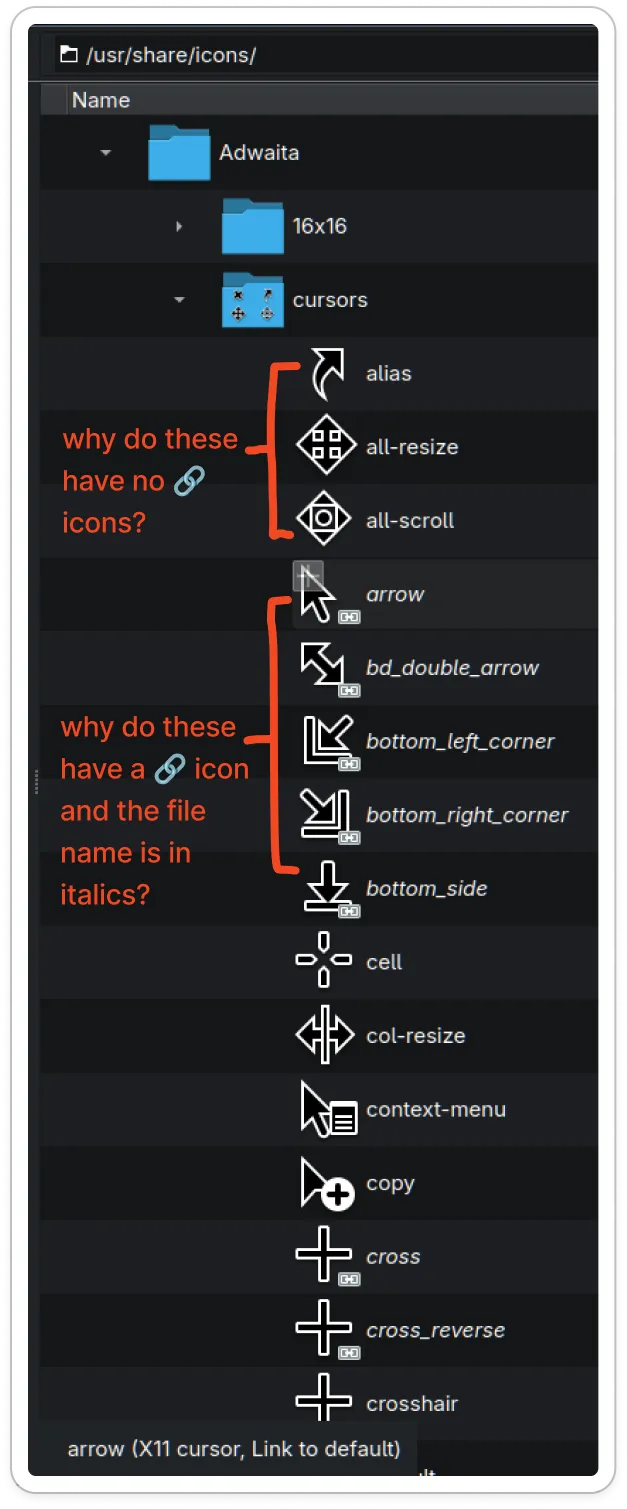
What’s that? Why is it like that?
Then I saw at the bottom of the file explorer that there’s a note specifically mentioning that the arrow file (for example, I highlighted it here) is an X11 cursor and it’s a link to default. After scrolling down the rest of the files, there is a default cursor file that doesn’t have a link icon for its preview.
Judging from how everything else is laid out in the folder, I inferred that this is how one could indicate what cursor will be used for pointers, crosshairs, indicating text input, resizing things, etc. I went ahead and used this as a reference and plotted the Gold Ship cursor set files to the naming convention of Adwaita.
This is the final output:
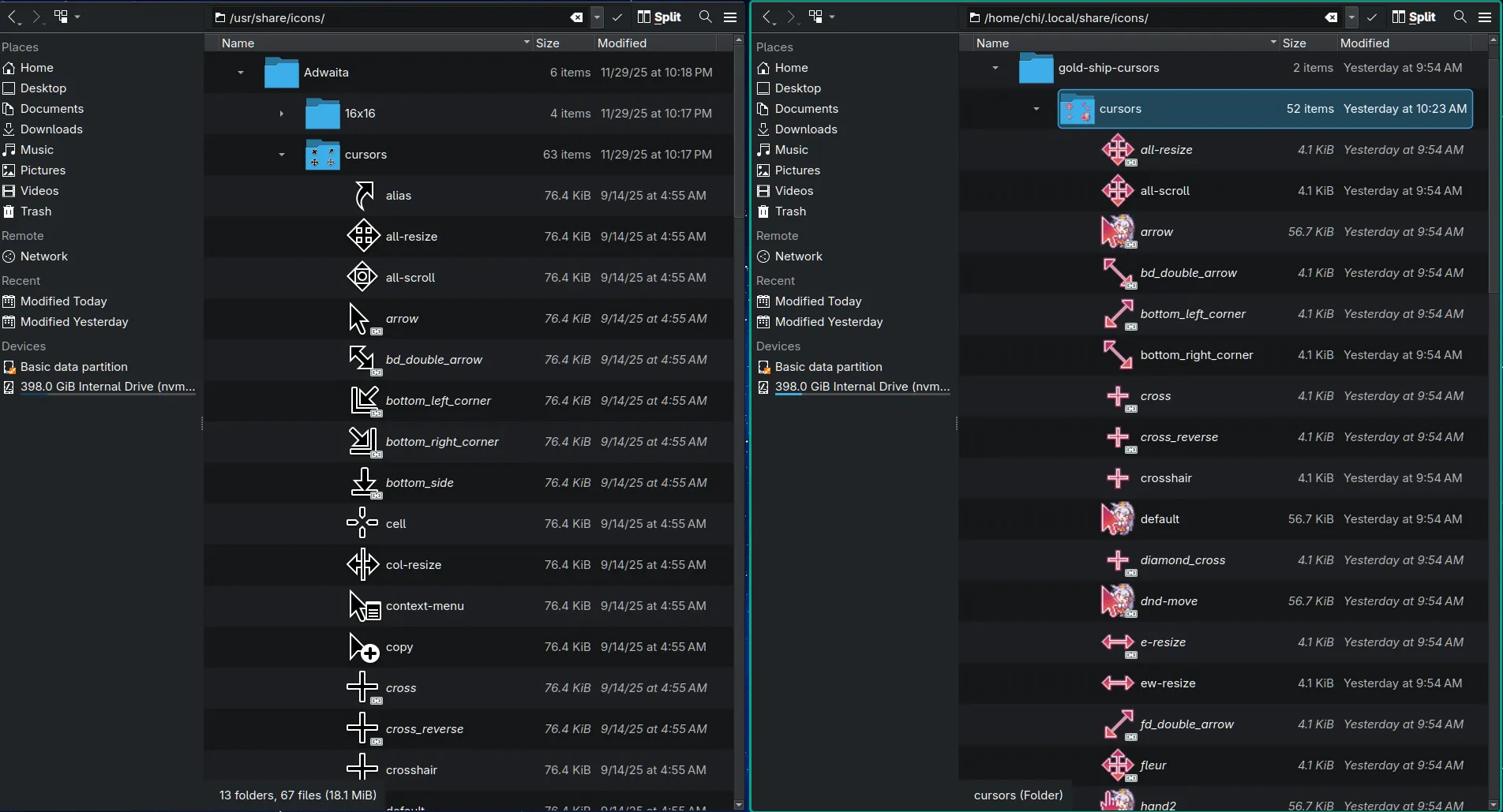
The left side is my reference, which are the Adwaita cursor images. The right side is my cleaned up version for the Gold Ship cursors to work well with Linux.
Explaining the (manual) process
I didn’t know how to do this programatically, so I did each remapping one-by-one.
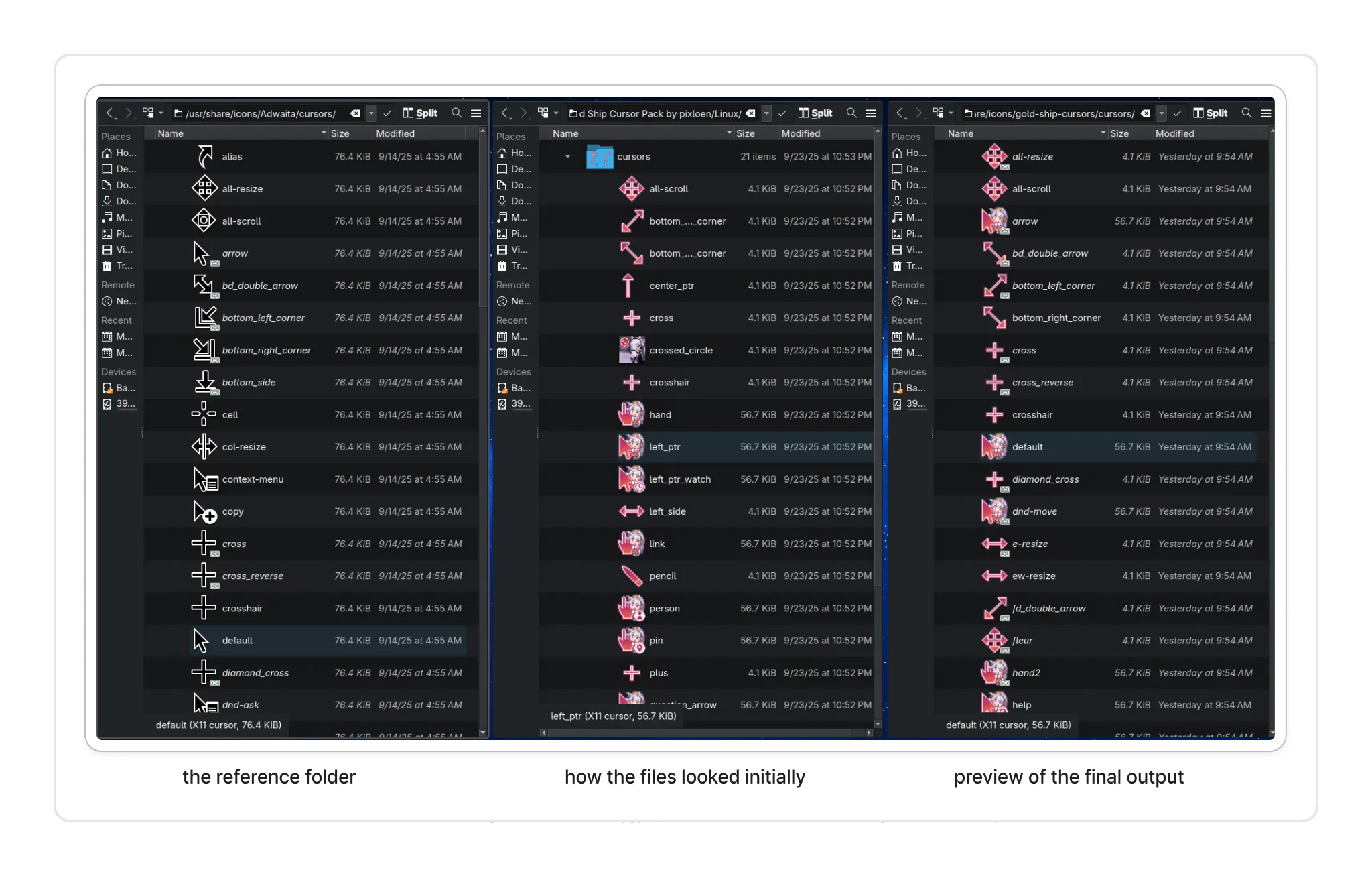
My process was just like this:
-
For each Gold Ship cursor file, check if another Adwaita cursor file has a similar setup.
-
Then,
- If the Adwaita file reference is a symlink to another file (AKA it has the 🔗 icon), I check what the original file was. For example, the
arrowcursor file is a symlink to thedefaultcursor file. - If the Adwaita file reference is not a symlink (AKA no 🔗 icon present), I just take note that this would be the main reference for other cursors.
- If the Adwaita file reference is a symlink to another file (AKA it has the 🔗 icon), I check what the original file was. For example, the
-
In the Gold Ship cursors folder, I just copy the implementation based on what I indicated in #2.
-
For main reference files, I just do simple renaming. So for example,
defaultin Adwaita is the default pointer, but I noticed in the exported file, the file name isleft_ptrinstead. To align it with the Adwaita reference, I set the file name to be the same. -
For symlink files, I had to run some terminal commands to set this up, since I didn’t see any way to do that with my file explorer. For the sake of making it easier to type the commands, I opened a terminal within the
cursors/folder and ran the following command:ln -s <original_name> <name_of_symlink_file>
This essentially creates a new symlink file, makes its target whatever file name was mentioned first, and its new file name is the second indicated value.
Here’s the history of my shell logs when I set it up:
-
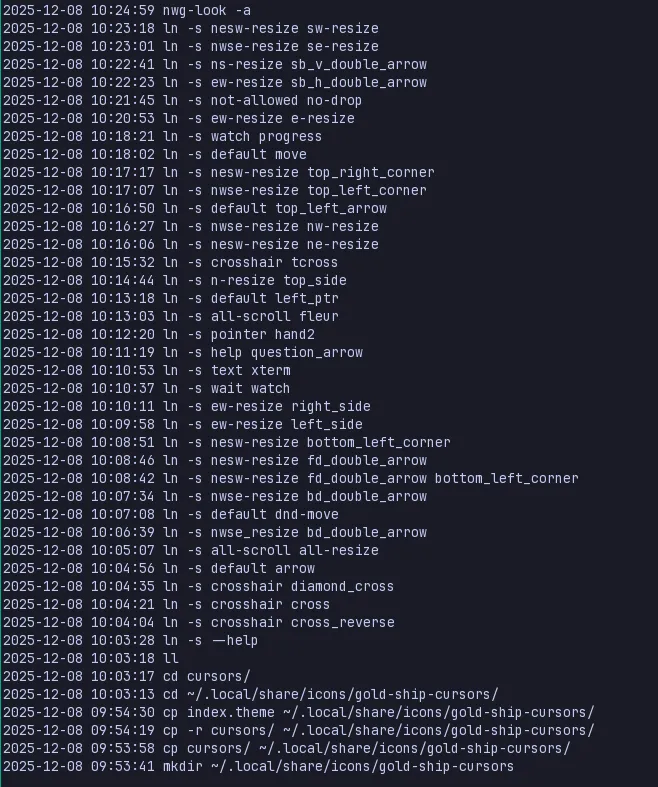
There’s some liberties exercised in some of them, where I matched them based on what the cursor felt like it would work better in.

An example is the wait cursor for golshi3, instead of copying how Adwaita cursors have it set up—where wait and watch are the same cursor—I used the left_ptr_watch cursor instead and just renamed it accordingly.
4. Once I was done doing that, I had one last thing to check: the index.theme file. The exported cursor pack also did have the same file, but I edited it to rename the title, add a description, and also add an Inherits= item and set it to Adwaita, to make it some sort of fallback cursor theme.4

After selecting the Gold Ship Cursors in my GTK Settings and clicking Apply, I rebooted my Linux machine and hoped for the best.
When it loaded again… violà! It’s here!
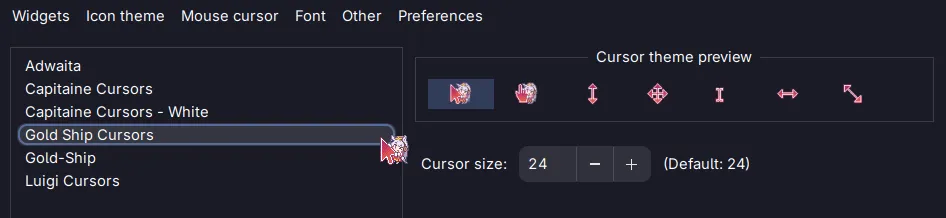
I’m so happy the cursor also has animations. She’s so cute next to the cursor pointer. Anything but training loljk
Some reflections after doing… all that
Part of me wonders if (a) another tool to convert Windows cursors into Linux cursors already exists elsewhere online, I just haven’t searched hard enough, or (b) regardless of the first point, if I could build whatever I did manually into an executable script that could help someone else in the future (or me! lol).
I did initially also want to reach out to the artist who put together the umamusume cursor themes to share that the Linux version in her other cursor themes may not necessarily work out of the box like how the Windows and Mac (maybe?) would, and to share that I got to make it work with golshi’s and could fix the rest for her too. I dunno. Maybe it would be smarter to do that if I figure out the less-manual way to go about it 😆
I also wanna do the same for the Luigi cursors I already got to convert already… maybe I’ll share the files once I’ve cleaned it up so at least if someone else wanted to have that cursor theme, most of the tedious work has been done 😆
This post became longer than I initially thought it would be, but if ever you read until here, thank you! You deserve a carrot. 🥕 Or a break. Or both. 😛
Footnotes
-
As I was writing this post, I searched for the link to the original creator, and I found her original post for this very same cursor set in DeviantArt. Man, she made this in 2010! 😱 It’s been that long ago wow time flies ↩
-
Initially I downloaded it without paying anything since it was allowed, but now as I write this, I gave 5 USD to chip in and to thank her for the wonderful set 😁 ↩
-
The nickname for Gold Ship, the umamusume character. I’ve been typing her name in full for so long and only now did I decide to just write her nickname lmao ↩
-
I do not know if this actually works as intended as I haven’t really encountered any interactions yet that would merit having to show those other cursors I didn’t map yet, so I guess I’ll just see in the future what happens. ↩